Hide Files & Folders2.1
Publisher Description
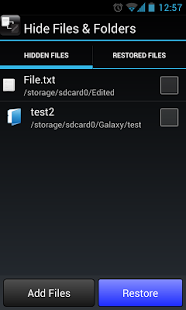
Hide Files & Folders is a free utility to hide files and folders.
NO RESTRICTION.
HIDE AS MANY FILES \ FOLDERS \ IMAGES \ VIDEOS AS YOU WANT.
You can not only hide your secret files and folders but also protect them with a password.
Just browse files and folders and add them to this app to hide.
Features:
1.Browse and Hide: Just browse and select files\folders to hide.
2.Password Protection:Enable password protection in the Settings screen.
Set password to protect them from unauthorized access.
3.Easy Restore:The currently hidden files\folders are listed in HIDDEN FILES tab.
Just select single or multiple files\folders from the list and click 'RESTORE' button to restore.
4.Restored File History:After a file is restored, it is listed in the RESTORED FILES tab.
You can just hide the restored file with click of a button from this tab without browsing the same again.
5.You can also delete files\folders using the application.
Please be careful with this operation. Files will be deleted permanently from the device after your confirmation and this action cannot be undone.
In case you hid some files but before restoring them, you have uninstalled the app and now you cannot see those files. Don't worry!, your files will are still in your device but in a different location.(/sdcard/.hffiles/.files/).
Just re-install the app to restore the files again.
About Hide Files & Folders
The company that develops Hide Files & Folders is RTM Labs. The latest version released by its developer is 2.1. This app was rated by 4 users of our site and has an average rating of 3.5.
To install Hide Files & Folders on your Android device, just click the green Continue To App button above to start the installation process. The app is listed on our website since 2017-03-18 and was downloaded 47 times. We have already checked if the download link is safe, however for your own protection we recommend that you scan the downloaded app with your antivirus. Your antivirus may detect the Hide Files & Folders as malware as malware if the download link to com.rm.filehider is broken.
How to install Hide Files & Folders on your Android device:
- Click on the Continue To App button on our website. This will redirect you to Google Play.
- Once the Hide Files & Folders is shown in the Google Play listing of your Android device, you can start its download and installation. Tap on the Install button located below the search bar and to the right of the app icon.
- A pop-up window with the permissions required by Hide Files & Folders will be shown. Click on Accept to continue the process.
- Hide Files & Folders will be downloaded onto your device, displaying a progress. Once the download completes, the installation will start and you'll get a notification after the installation is finished.
Program Details
System requirements
Download information
Pricing
Version History
version 2.1
posted on 2017-03-18
1) Bug fixes and stability.
version 2.0
posted on 2015-07-11
1) "Recover Corrupted files" option added in menu.,2) Fixed a issue with external SD card.,3) Bug fixes and stability.
version 1.9
posted on 2014-06-27
Several fixes and updates
